
Zoiper and 3CX phones are popular soft phones that runs on your computer. | 3CX Configuration |
Download Zoiper
Zoiper SIP configuration
Zoiper is a free SIP/IAX softphone. Here is the configuration for Zoiper SIP account. IAX can be set up in a similar way. Zoiper IAX configuration is also available.Step 1
Click the "Option" icon as shown below: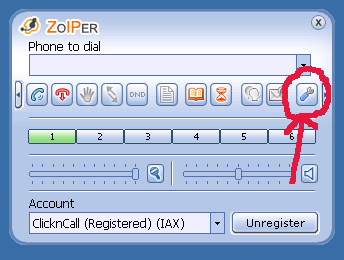
Step 2
Click "Add new SIP account" and give it a name such as "ClicknCall":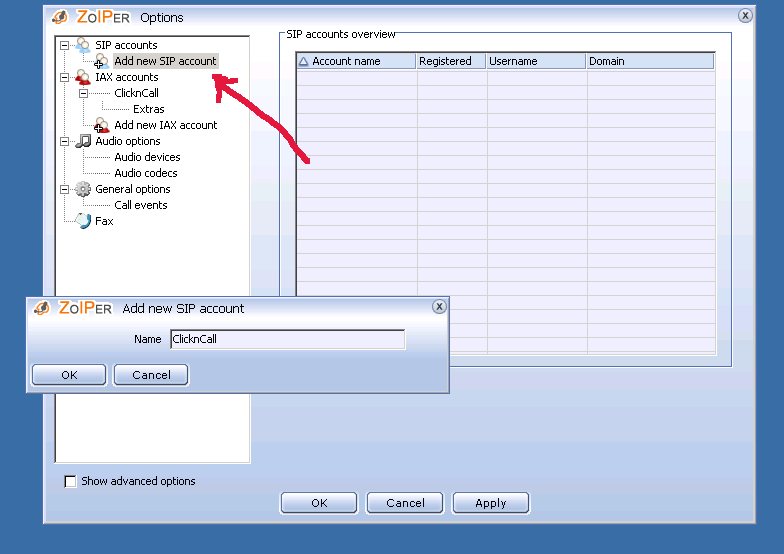
Step 3
Type in your ClicknCall username and password (Note: Please use the ones contained in your original Welcome email) and click Apply.Please try not to copy/paste the username/password from the welcome email because sometimes an extra space could be introduced when copying/paste thus making the password wrong.
Please try typing them in instead.
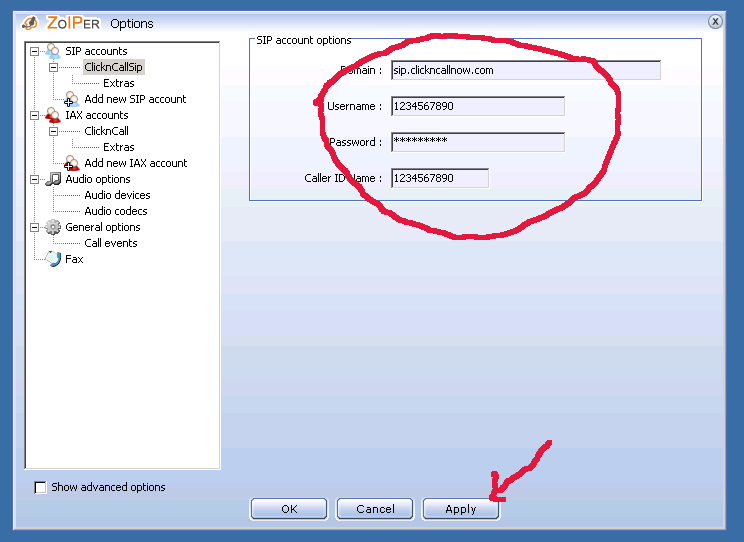
Step 4
Start making cheap calls! Please remember to include area code such as 02, 03, 07, 08 in front if you are calling Australian landlines.